Search This Blog

Showing posts with label application. Show all posts

Sunday, 24 November 2013

Moments of my intimate contact with electricity: Touching Mosquito Racket Zapper net…

I knew it is a bad idea, that it is going to be painful… and yet the temptation was just too strong Smile
Plus – no harm for doing that right? After all, people accidentally does it once a while…

So with the power on – and closing in with index finger – I finally get closed enough – for a spark to “shoot” into my finger – and yap, it was painful – just like being poked by a needle! And it never cease to impress me what electronic can do, with couple of AA battery, this thing can boost it up to kV for zapping!
So this is where the boost converter comes in, with a boost converter, we can easily step up any voltage to the desired level, and it is pretty common in electronics (camera flash, spark plug….) And who says electronic is boring??

Monday, 7 October 2013

About AC-DC Adaptor–Heavier is better

So i heard from a long time ago – when choosing a AC-DC adaptor – heavier is better. Really?

For a circuit guy – like myself – I think what the saying is really trying to tell you that AC-DC adaptor with transformer built in is better. For this I can’t agree more... from low level signal perspective.

For a +5V AC adaptor without transformer – each and every node inside the adaptor circuit is considered “LIVE” which means it is dangerous – the AC outlet voltage 230V for example is directly switched by silicon IC, and filtered to give a output of +5V. See schematic below:
image
(picture from some online forum.. sorry that can’t remember where I got it exactly, been with me for some time)

For a +5V AC adaptor with transformer – generally the transformer will scale down the line voltage to much managed able 12VAC or so, before passing it through bridge rectifier to and further drop down to +5V. So the secondary side of the transformer is not “LIVE” and much safer to mess around. Note that since the switching is done at much lower voltage level – the electrical noise will be much less. As shown below:
image

There are considerations on which is better – costing, how “clean” it is..., eventually it is up to the application and individuals to decide. For me, when I build something that requires mV or nA level of accuracy – those with transformer are definitely my choice of adaptor. Other than that, it does not bother me much.

I guess at the end of the day, knowing the fundamental of different AC adaptors allow an engineer to decide what is good enough for the application, and this especially important when dealing with low level analogue signals.

Friday, 6 September 2013

What does equation y=mx+c got to do with specification?

Well, almost most of them. Take example, a voltmeter spec of +/-(10% of reading + 10% of range). The first term of % of reading is referred as gain error, and second term of % of range is referred as offset error.
to understand this from graphical approach,
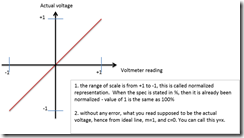
let’s start by drawing out a x-y axis – with x being voltmeter reading and y being actual value
then draw a line with y = x (implied m=1, c=0) from –1 to +1.
Let’s try to interpret this graph
image

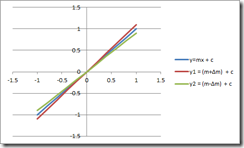
now, to further discuss this, i think it is best to throw in some number – let’s consider the gain error of +/-10%. what it means is that the line will has a slope of 10% deviation from our ideal line (m=1, c=0).
if gain error is all that we have, then we have something like below:
image

next let’s consider the case where gain error is zero, and +/-10% of offset error (remember that we are taking about +/-10% of measurement range offset). for this we have
image
Now, for the real world instrument – gain error and offset error is real and cannot be ignored.
Factor in both gain and offset error, we have resulted in a series of possible lines that the real instrument behave.

image
From the look of it, it seem pretty bad – as the uncertainty is high for the voltmeter reading, in fact – up to 20% of measurement range. But, what you pay is what you get, gain and offset error of 10% is chosen for the sake of our discussion here. For real voltmeter with decent pricing, you can easily get 0.1% accuracy for both offset and gain. In certain case (depend of calibration, operating temperature, pricing…) you can even get better than 0.01%! Now, that is impressive.

Note:
In this example we used a voltmeter, but most measurement / sourcing instrument (source measure unit, power supply, oscilloscope, capacitance meter….) present their spec in similar form. So you can apply this method to have a sense of what the spec mean – with graphical approach.

Sometimes, the manufacturer will give un-normalized spec for offset, which is essentially the same thing. take our example here of +/-(10% reading + 10% of range) , if the range is 10V, the equivalent un-normalized spec will be +/-(10% reading + 1V)

Saturday, 6 April 2013

Thinking In Terms of Current– Photodiode Circuit Example

From the last post (http://electroniccircuitdesignsharing.blogspot.com/2013/03/thinking-in-terms-of-current.html) that talk about the importance of being able to think in term of current, now let’s look at particular example of circuit that basically manipulate current to get the desired result.

Shown below is a circuit that convert infrared light level into a voltage. Now, the photodiode convert infrared light density into current. This circuit is to provide a 0V bias across the diode (operate the diode in Photovoltaic mode) and convert the current into a low impedance voltage level for further operation.
image

In this circuit, the diode being used in Photovoltaic mode, and details about the diode operation can be found from http://en.wikipedia.org/wiki/Photodiode as shown below:
image

This is just one of many examples of the advantage being to think comfortably in term of current. Try to make sense of this circuit only thinking in voltage term will be a nightmare, since the inverting input of the op-amp supposed to be a “virtual ground”, and 0V across the diode does not make much sense.

Friday, 5 October 2012

Getting to know simulation - Part11 - Monte Carlo


To best illustrate the usefulness of the monte-carlo simulation, let’s use a voltage divider as example.
Run Transient simulation and get:
So this is a perfect voltage divider. But we all knows that resistor has tolerance, let’s say each of R1, R2 has 1% tolerance. We should factor this in by running Monte Carlo simulation and see what are we dealing with.
Enter 1% as the resistor tolerance.
Tick “Enable multi-step” to enable Monte-Carlo analysis


Set number of runs to 100
Re-run the transient simulation to see gain statistic of  divider made of 2 pieces of 1% resistor.
With resistor tolerance of 1%, the voltage divider will give an error of ~-0.9% to ~+1%. Use of Monte-Carlo simulation will ease such analysis. If your application cannot tolerate such variance, then resistors with better tolerance are needed.

Friday, 28 September 2012

Getting to know simulation - Part10 - Multi-Step


So continue from previous session, inserting C2 1nF to kill oscillation gives you the stability but make your buffer damn slow. You can try out few value to see the optimum C2 value for highest speed and still gives you the best stability, instead of manually change the values and re-run Transient Simulation, there is something called “Multi-Step” analysis that let you sweep any parameter and plot the result.


1. Open up analysis and tick “Enable multi-step”
      2. Click “Define…” button and key in the  info as below:
3.  Run the simulation and you get the plot shown – looking at 1pF, 10pF, 100pF, 1nF you see that the best capacitance value for performance is at 10pF. And now you have a complete buffer design for the application stated in Part1 :) . 

Saturday, 22 September 2012

Getting to know simulation - Part9 - Fixing oscillation

  
1.       There are plenty of ways to resolve this, one way is to add a capacitor in parallel with feedback resistor R2. Let’s do this in the schematic and re-do the AC simulation. At this point of time, the value of C2 is arbitrary chosen to be 1nF, we will talk more about this in next session – any way the latest schematic becomes:  
2.       Re-do the simulation for AC with simulation frequency up to 10MHz to see the new closure- you can see now that the rate of closure becomes 20dB / decade – indicating stability has achieved, let’s modify the schematic to re-do the transient
3.       To look at the end result of the fix in time domain, insert 1nF for the transient simulation file:


4.       Re-run of transient simulation shows that so we have solved the problem of oscillation – but the problem is that the output of the buffer takes 4ms to settle to the right value – too slow for our liking – this we will try to solve in next session.

Friday, 14 September 2012

Getting to know simulation - Part8 - Arranging bode plot for AC analysis

1.       The best way to do AC stability analysis to plot Aforw vs 1/beta, plot of 1/beta essentially is the inversion of the beta gain – which is input/output instead of output/input – so let’s reverse the bode plot  and rename the block as shown
2.       So now you can see that the 40dB per decade closure of Aforw and 1/beta is the cause for oscillation


Friday, 7 September 2012

Getting to know simulation - Part7 - Bode Plot from a buffer circuit (that oscillate)


Continue from last post, to solve the problem, we need to acknowledge that the buffer circuit is in fact a feedback loop
To identify which components belong to with block – refer to the blog
Let’s modify the schematic to perform bode plot analysis
1.       Ground non-inverting input – since op-amp input is already high impedance – any voltage source with series resistance is pretty much behaving just like a pure voltage source – for DC voltage source, it is always a AC ground.
2.       Place large inductor, infinite AC coupling capacitor and AC source, configure the AC source as below:
3.       Choose AC analysis:
4.       Your schematic should becomes:
5.       After simulation, you get
6.       But, how to interpret the plot?

Sunday, 2 September 2012

Getting to know simulation - Part6 - Practical circuit consideration

Continue from last simulation done in Part5, the simulation result shows that the circuit is too ideal – in practical PCB, there will be about 10pF of capacitance from op amp input pin to GND, let’s insert this capacitance as below:

Re-run the transient and get:

In this case, we caught the potential issue - oscillation – as to solve it, let’s do it in the next posts.

Saturday, 25 August 2012

Getting to know simulation - Part5 - Transient Simulation

So far so good for DC, but we still need to know the characteristic for fast changing sensor output – what’s the waveform going to be. Let us replace Vsensor from DC 1V to Step 1V by double click on the source and configure the output to be 1V Step voltage with 2ms delay:

To ease subsequent examples about simulation, change some of the op amp settings by double click on it, change as below:


To plot the waveform, insert a probe at the output of buffer (short cut “B”)


Then choose Transient analysis:
And you would get nice waveform as shown below:

So far so good - but is it too good to be true?

Getting to know simulation - Part4 - insert basic buffer amplifier


To continue from previous post, let’s modify the circuit above as below
1.       Insert a parameterised opamp from menu Place –> Analog Functions ->  Parameterised Opamp
2.       Insert a +/-15V DC supplies from menu Place –> Voltage Sources ->  Power Supply
3.       Insert off-page connectors from menu Place -> Connection -> Terminal
4.       Wire up the opamp as x2 buffer amp using 1Meg Ohm resistors (so that 1V full scale sensor output will translate to 2V full scale ADC input). Route the circuit accordingly, re-run DCOP simulation and you get:
Now with the buffer – we get pretty good DC result – 1V sensor translated into ~2V adc input. For now, don’t concern yourself with the ~20mV error (2V – 1.97997V), we will cover this some other time.

Saturday, 18 August 2012

Getting to know simulation - Part3 - using DCOP

Let’s look at the reason we need to design the buffer. If we direct connect the sensor to adc input –
We will have 1V * 1k/(100k + 1k) ~= 10mV only, clearly this is not acceptable. Note that in Mindi, instead of using R1, R2 ... you can right click on component and change its name, in this case Radc is the name chosen to represent the ADC.

To simulate – all spice required “Ground” symbol for reference, so let’s insert one as below, double click on V1 and rename it to Vsensor, and change name of R1 to Rout.
We want to know the voltage at ADC input, so place voltage marker on the interconnect node for Rout, Radc to see the voltage


Schematic after placing marker:
Then choose simulation mode to be DCOP
And click “Run”


Now you see the need for buffer circuit. DCOP is the first thing that I recommend for any simulation, since it let you see the DC biasing in the schematic itself  – especially when the circuit is much more complicated than this. You can place as many markers as required.

Getting to know simulation - Part2 - Modeling


Let’s get started by modeling the blocks in schematic – knowing how to model is critical – else it will be GIGO (Garbage-In-Garbage-Out).

1.       Modeling of the sensor to ease design process – if you look at sensors such as microphone, transducer, you would find that most of them if not all do not have “Low output impedance”, which means, you cannot use a voltage source to model it. So let’s model our sensor as below, the values of R1, R2 is not important, which will become clear at this end of the series: in this case, output of the sensor is 1V.
2.       As for the ADC,  to ease design process let’s use a 1kOhm resistor to represent it – it is the load of the buffer circuit, at the end of the series, you will know why this is good enough

Getting to know simulation - Part1 – Introduction

Getting to know simulation - Part1 – Introduction

In circuit design - simulation tools will ease your life a lot - if you know what you are doing. As such I am writing a series of posts that I hope will best help you to understand what you can do with simulation - by using a buffer amplifier design example. The goal is to introduce basic features such as
  1. DCOP
  2. TRAN
  3. AC
  4. Multi-Step
  5. Monte-Carlo
Let’s take an example as below:

1.      Supposed that we need to design something that interface a sensor to ADC, so we have
a.      sensor
b.      The ADC
c.       And something in between – a voltage buffer – and this is what we need to design
2.      To supplement the design example, let’s put some more details
a.      Sensor bandwidth is at least 10kHz
b.      Sensor can swing from 0V to 1V
c.       ADC full range voltage is 0V to 2V.
Since I am a user of Mindi from Microchip, I will use Mindi as examples, but essentially all simulation tools have the basic set of features. If you want, you can install Mindi mentioned from my earlier blog (In this case, you can quickly test out the example):  http://electroniccircuitdesignsharing.blogspot.com/2012/03/tools-for-circuit-design.html.

Alternately, you can down load SIMetrix from http://www.simetrix.co.uk/site/demo.html, which is essentially the same thing as Mindi (just the name different as far as I am concerned, same GUI, same file type....)

My advice is to play around with your simulation tools, knowing the capability of what it can do will make your life a lot more fun :). So wait for Part 2 to get started.